Your agents are putting in the hours, the contact list is loaded, but you still don’t have enough conversations. Too many voicemails and follow-ups are slipping through.
This is more a problem with your tools than your strategy.
A rep manually dialing can realistically make 40–60 calls in a day. A team using dialer software can hit multiples of that, with more live conversations instead of waiting through rings and leaving voicemails.
At Readymode, we work with outbound sales teams every day and see firsthand how switching to dialer software changes contact rates and productivity. Premier Home Solutions, for example, saw a 4x increase in productivity after switching from manual dialing to a predictive dialer.
That said, manual dialing isn’t always the wrong choice. For certain team sizes and workflows, it still works.
So how do you decide? Here’s how manual dialing stacks up against dialer software.
TL;DR: When to Switch From Manual Dialing to Dialer Software?
Manual dialing is when your sales reps dial each prospect’s number by hand, one call at a time, using a phone or basic CRM. Dialer software automates that process, with some dialing modes connecting your reps only when a live person answers.
Key differences:
- Manual dialing significantly limits how many calls each rep can make in a day compared to dialer software.
- Dialer software can log call outcomes, schedule follow-ups, and track performance automatically. Manual dialing relies entirely on your reps doing that themselves.
- Compliance tools for managing internal DNC lists and state calling restrictions are built into dialer software. With manual dialing, your team tracks all of that by hand.
- Dialer software scales with your team. Manual dialing scales only if you add more people doing the same slow process.
When to switch to a dialer:
- Your reps are working through hundreds of leads a week but still missing outreach targets.
- Follow-ups are slipping and leads are going cold between calls.
- Your contact rates are dropping, and you don’t know why.
- You’re adding agents, but overall output isn’t growing.
What to look for in dialer software:
- A built-in CRM so leads, call history, and follow-ups live in one place
- Multiple dialing modes so you can match your approach to each campaign
- Caller ID reputation monitoring if you’re running high call volumes
Manual Dialing vs. Dialer Software: Key Differences
Before diving deeper into how manual dialing and dialer software work, let us give you a quick bird’s-eye view of the main differences between these outbound calling approaches.
| Manual Dialing | Dialer Software | |
| How it works | Reps dial each number by hand, one at a time | Automates the process of placing outbound calls |
| Best for | Small teams with low, targeted call volumes | Teams running medium- to high-volume outbound campaigns |
| Daily capacity | 40–60 calls per rep | 100–300+ calls per rep depending on campaign and dialing mode |
| Follow-up tracking | Manual, relies on rep discipline | Logged automatically via built-in or integrated CRM |
| Compliance tools | None built in | Internal DNC list management, state calling restrictions, calling windows |
| Caller ID management | Not available | Available with advanced tools such as Readymode iQ |
| Scalability | Adding agents is the only way to grow output | Add campaigns and agents without changing the core workflow |
| Performance reporting | Inconsistent, depends on manual logging | Detailed and centralized |
| Setup required | Requires basic tools such as a traditional landline, phone system, CRM | Requires onboarding, though Readymode offers free 1:1 onboarding/implementation support for 3+ licenses |
| Cost | A basic CRM and a cellphone or landline | Per-license monthly fee is an upfront investment, but ROI grows as call volume and contact rates increase at scale |
What Is Manual Dialing?
Manual dialing is the process outbound sales reps and appointment setters use when they dial each prospect’s number by hand, one call at a time.
That means working through a lead list from a cell phone, traditional desk phone, VoIP line, or a basic CRM with a click-to-call feature.
In a manual dialing setup, there’s no system managing the queue, pacing the calls, or logging outcomes. You find the number, dial it, wait, and then manually record what happened before moving to the next contact.
Some teams track this in a spreadsheet. Others rely solely on calendar reminders or notes in a basic database.
Every step, from finding the number to logging the outcome, falls on your rep.
Why Some Teams Still Manually Dial (and How It Holds Them Back)
Manual dialing still makes sense for certain teams. If your call volume is low, your workflows are simple, or you’re just getting started with outbound sales, it can be a reasonable place to begin.
But for growing outbound teams, the limitations show up fast. Here are the most common ones we see almost every day.
1. Your reps spend more time dialing than talking
Every call means finding the number, dialing it, waiting through rings, leaving a voicemail, logging the outcome, and then starting over. According to Salesforce’s State of Sales research, reps spend roughly 60% of their time on non-selling tasks when relying on manual processes. That leaves a narrow window for actual conversations each day.
2. Scaling is harder than it looks
Adding more leads to the list doesn’t automatically mean more conversations. It means more of the same slow, repetitive work per rep. There’s a ceiling on daily output, and growing teams hit it quickly without changing their approach.
3. Performance tracking becomes unreliable
When reps log calls manually in a spreadsheet or basic CRM, data quality depends entirely on rep discipline. Notes get missed, follow-ups don’t get scheduled, and leads fall out of the funnel without anyone noticing. That makes it difficult to coach your team or spot what’s actually working.
4. Compliance is harder to manage than most teams realize
Some teams stick with manual dialing specifically to stay in control of compliance. The problem is that tracking call attempts, internal DNC lists, and state-specific calling restrictions by hand leaves too much room for error. A lead can get called too many times or contacted outside permitted windows, and without automated guardrails, those mistakes are easy to miss until they become a real problem.
What Is Dialer Software?
Dialer software automates the process of connecting your agents to live calls. Instead of dialing
numbers one by one and waiting, the system handles the dialing. Depending on the dialing mode, the system can either assist reps by placing calls automatically or connect them only when a live person answers.
You’ll also hear it referred to as a sales dialer, outbound dialer, auto dialer, or outbound calling software depending on the context.
There are four main types, and the right one depends on how your team operates:
- Preview dialer: Shows the rep the lead’s details before the call is placed. The rep reviews the information and then initiates the call.
- Power dialer: Dials one number per agent automatically, moving to the next contact as soon as the previous call ends.
- Progressive dialer: Similar to power dialing but with pacing controls, so the system waits until an agent is fully ready before placing the next call.
- Predictive dialer: Dials multiple numbers simultaneously per agent and connects the rep only when a live person answers. Uses algorithms to predict agent availability and answer rates.
Readymode includes all four modes across both its plans, so your team can match the dialing approach to the campaign.
The Benefits of Using a Dialer
Compared to manual dialing, dialer software offers multiple advantages for high-performance outbound teams.
Here are the most common ones:
1. More live conversations per shift
A predictive dialer skips unanswered calls, voicemails, and disconnected numbers automatically. Your agents spend their time talking, not waiting through rings.
2. Leads stop falling through the cracks
When your dialer connects to a built-in CRM, call outcomes can be logged right away. Callbacks get scheduled, and nothing gets lost between shifts or on a rep’s busiest day. Readymode iQ takes this further with custom call cadences that let you define exactly when and how often your team follows up with each lead.
3. You know what’s working
Instead of relying on spreadsheets or rep memory, you get a clear picture of how many calls went out, how many connected, how long conversations lasted, and what happened next. That makes it easier to coach reps, spot underperforming campaigns, and make adjustments before small problems become big ones.
4. Your team can work from anywhere
Cloud-based dialing software means your agents don’t need to be in the same building, or even the same time zone, to run consistent daily outreach. For teams managing remote or hybrid setups, that’s especially useful.
How Dialer Software Impacts Performance Compared to Manual Dialing
We briefly mentioned Premier Home Solutions earlier in the article. It’s a water filtration and solar sales company with 25+ appointment setters that used to manually dial every customer and track progress in spreadsheets.
Their appointment setters constantly switched between dialing, tracking, and scheduling, which broke their momentum and capped how many homeowners they could reach each day.
After switching to Readymode’s predictive dialer in 2023 and later upgrading to Readymode iQ to tackle flagged numbers, they achieved a 4x increase in productivity and started booking more appointments daily.
The pattern shows up across industries.
Dial Masters Solutions, a real estate-focused outbound marketing agency, switched to Readymode iQ to address low connect rates caused by flagged numbers. Within three months, they saw a 30% increase in lead conversion rates, a 25% boost in agent productivity, and a 20% increase in customer engagement.
Signs You Need a Dialer and How to Choose the Right One
So when exactly do you switch from manual dialing to dialer software? Here are the most obvious signs to look for:
- Sign #1: Your call volume is growing: If your reps are working through hundreds of leads a week and still not hitting outreach targets, manual dialing could be the bottleneck.
- Sign #2: Follow-ups are slipping: If leads are going cold because no one tracked the callback, that’s a workflow problem a dialer and CRM can solve directly.
- Sign #3: Your contact rates are dropping: If fewer people are picking up without an obvious reason, your numbers may be getting flagged as spam. Manual dialing gives you no visibility into that and no tools to fix it.
- Sign #4: You’re calling across multiple states: Managing calling hours, internal DNC lists, and state-specific restrictions by hand is a compliance risk that grows with your call volume.
- Sign #5: You’re adding agents, but output isn’t growing: More reps doing the same manual process just means more of the same ceiling. A dialer changes the output per agent, not just the headcount.
What to Look for in a Dialer: 6 Key Features
Once you’ve decided a dialer makes sense, these are the features to prioritize.
Feature #1: Built-in CRM and Lead Management
A customer relationship management (CRM) platform stores your lead data, call history, notes, and follow-up tasks in one place. Without it, your team is juggling multiple tools and manually syncing information between them, which slows everything down. If you’re moving away from manual dialing for the first time, this is especially important.
Readymode includes a fully integrated CRM across all plans, so everything your reps need is in one place from day one.
Feature #2: Multiple Dialing Modes
Different campaigns need different approaches. A high-volume insurance campaign runs differently than a warm callback sequence for real estate leads, and a single dialing mode can’t serve both well. Look for a platform that lets you switch based on the campaign.
Readymode offers preview, power, progressive, and predictive modes on every plan, along with answering machine detection so your reps stay focused on live conversations.
Feature #3: Built-in Compliance Tools
Outbound calling comes with real legal obligations, including DNC list management, state-specific calling hours, and holiday restrictions. Getting these wrong exposes your business to fines and complaints. These safeguards should be built into your dialing platform, not tracked in a spreadsheet on the side.
Readymode includes built-in tools to support compliant outbound workflows, including internal DNC list management, as well as features and integrations that help teams scrub against the National DNC Registry where required.
To learn more about compliance requirements and best practices, visit our Compliance Center.
Feature #4: Caller ID Reputation Monitoring
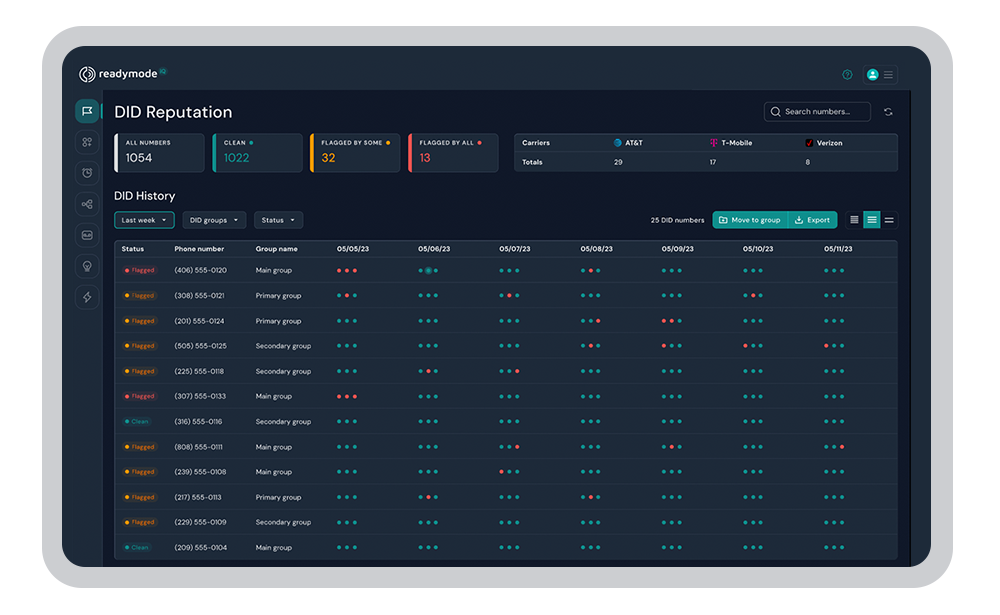
When a carrier flags your number as spam, prospects stop picking up. Most teams don’t notice until their contact rates have already dropped. You need visibility into how your numbers appear across carriers and tools to fix flagged numbers quickly.
Readymode iQ includes caller ID reputation monitoring, Assisted Remediation to properly register numbers and help clear spam flags, and Autopilot, which automatically selects your best-performing number for each call based on carrier-level data.
Feature #5: Transparent Pricing That Scales With Your Team
Some platforms price low upfront but charge extra for essential features as your call volume grows. That makes it hard to plan and easy to overspend. Look for clear, predictable pricing that includes the functionality you need without relying on multiple add-ons.
Readymode offers straightforward, all-in-one pricing with no hidden feature fees. Starter is $239 per license per month, while Readymode iQ is $299 per license per month. Both platforms include unlimited outbound minutes (subject to our fair use policy), making it easier to scale your team and call volume without unexpected costs.
Feature #6: Solid Onboarding and Support
A dialer that’s set up incorrectly can create performance problems that take weeks to untangle. You want a platform that gets your team configured correctly from the start and stays available when issues come up.
Readymode offers free 1:1 implementation support for teams with three or more licenses, plus ongoing support at no extra cost. Premier Home Solutions onboarded their entire team of 25+ setters in one day.
Is Dialer Software Right for Your Team?
Manual dialing still makes sense in a few scenarios like high-ticket sales where every call is warm and researched, low-volume cold outreach, or if you’re just getting started and not yet at the stage where scaling is the priority.
But for serious scaling, it’s a different story. If your team is working through lead lists and focusing on consistent outbound activity, manual dialing quickly becomes a bottleneck. The time spent dialing, waiting, and logging outcomes limits how many conversations your reps can have in a day.
The teams that get the most out of dialer software are the ones who made the switch before the inefficiency became obvious.
Ready to see what that looks like for your team? Book a demo with Readymode, and we’ll walk you through the platform based on how you operate.

Jawad Khan
Jawad is a seasoned content marketer and freelance technology writer featured in some of the world's leading digital marketing, e-commerce, and software related publications. As an expert contributor, Jawad has written for startups and enterprises, including Fortune 500 companies, across various tech verticals.