
When your agents wrap up a call, they need to log what happened, either by typing notes in a text field or choosing a pre-defined label from a dropdown.
This is an important step because without it, nobody knows the lead’s status or whether it needs a follow-up call.
However, an inefficient logging process adds up fast across a large team. Research shows that outbound sales reps spend 60% of their time on non-selling tasks, including manually updating customer information in CRM systems.
A call disposition helps solve this problem by giving agents a fast, standardized way to not only log what happened on every call but also automate the resulting actions.
In this guide, we’ll explain what a call disposition actually is and how Readymode’s dialer features use dispositions to make the whole process faster.
TL;DR: What Are Call Dispositions And Why Outbound Teams Need Them
A call disposition is the label an agent picks after a call to record what happened, like Interested, Voicemail, or Do Not Call, and it moves the lead to its next step automatically.
Why it matters:
- Saves agents time between calls instead of typing notes
- Keeps follow-ups organized by triggering the next action automatically
- Produces consistent, reportable data across your whole team
What to look for in a dialer:
- A disposition list you can customize per campaign
- One-click logging from the call screen
- Automated callback scheduling
- Built-in DNC list management
- A dialer with a built-in CRM, or one that connects to the CRM you already use.
What Is a Call Disposition?
A call disposition is a label that sales agents assign to a call after it ends, to state what happened and mark its status. For example, Interested, Not Interested, Voicemail, or Do Not Call (DNC).
Call dispositions give agents a short list of set outcomes to pick from instead of writing a new note every time. Once an agent picks a label, the system updates the lead’s record and can trigger the next step, like scheduling a callback or pulling the number out of future dialing.
For example, if a contact says “stop calling me,” selecting the DNC disposition not only closes the call but also adds the lead to your internal Do Not Call list, so nobody dials that number again.
Call dispositions go by other names too, like a call result or a wrap-up code, depending on the platform.
Common Call Disposition Examples
Here are a few examples of common call dispositions to organize outbound call outcomes. Your actual options should reflect your sales process and the actions your platform supports.
| Disposition | When to Use It | Next Step to Define |
| Interested | The prospect wants more information but has not agreed to a callback or appointment. | Record the requested information and assign the follow-up. |
| Callback Requested | The prospect asks for another phone conversation. | Capture the requested time and schedule the callback. |
| Appointment Booked | The prospect agrees to a specific meeting or appointment. | Record the booking and clarify who handles it. |
| Not Interested | The prospect declines the offer without explicitly requesting that calls stop. | Apply your campaign’s agreed handling for declined offers. |
| Wrong Number | The person answering confirms the number does not belong to the intended prospect. | Flag the number for correction or removal from that lead’s record. |
| Do Not Call | The person asks you to stop calling. | Apply your internal DNC process. |
Treat these as definitions to adapt, rather than a universal code list. In particular, give agents clear instructions for handling an explicit stop-calling request.
Call Disposition vs Lead Status vs Call Note
People often confuse a call disposition vs lead status or even a call note. But all three serve different purposes.
- A disposition records what happened on one specific call. For example, Voicemail, Do Not Call.
- A lead status shows where that lead stands in the campaign right now. For example, New, Contacted, Qualified
- A call note captures the actual descriptive details in the agent’s own words.
Here’s a simple table to help you understand the differences.
| Call Disposition | Lead Status | Call Note | |
| Tracks | The outcome of one specific call | Where the lead stands in the campaign overall | The specific details of what happened |
| Frequency | A new one every call | Changes only when the lead’s stage actually shifts | Added whenever an agent chooses to write one |
| Format | Set option from a fixed list | Set option from a fixed list | Free text |
| Example | Voicemail, Not Interested, DNC | New, Contacted, Qualified | “Spoke to spouse, asked to call back after 5pm” |
| Triggers automation | Yes, can schedule callbacks, add to DNC, or transfer to a queue | No, it’s a status label only | No |
The Benefits of Using Call Dispositions
Why use call dispositions when you already log lead status and notes? Beyond what we’ve covered, dispositions offer three more specific benefits.
Benefit #1: Saves Time Between Calls
A call disposition saves your agents’ time and gives them a quick, frictionless way to record a call’s outcome. Picking a disposition from a dropdown list is faster and boosts productivity across your whole team.
One Readymode user actually highlighted this exact point in their G2 review.
“The quick tabs like ‘not interested’ or ‘do not call’ make it super simple for everyone to filter the client pool.”
That’s the whole point. Agents get back to dialing instead of typing.
If needed, your agents can use their call notes for details that will help with the next interaction, such as the prospect’s question or who needs to attend a meeting.
Benefit #2: Keeps Follow-Ups Organized
A call disposition helps you organize follow-ups by automatically routing each lead to its next step based on your agent’s selection.
For example, if an agent selects a callback disposition, Readymode opens the callback settings right there. The agent picks a time, four hours out or a specific date on the calendar. The system books that follow-up and moves on to the next call.
This keeps leads from falling through the cracks and helps you build a more reliable pipeline for your whole team.
Benefit #3: Produces Consistent Records for Reporting
A call disposition also produces more consistent records for reporting, since every call gets logged using the same set of standardized options.
So, if your dispositions include voicemail, DNC, and call later, your reports sort every call into one of those three labels. That gives you a clear picture of where your campaigns stand.
Standardized dispositions are more reliable and actionable than random descriptions in your agent’s own words.
Call Disposition Best Practices: How To Use Them The Right Way
Having call dispositions in place isn’t enough on its own. How you set them up determines whether they actually help your team or just create more clutter. Here are the best practices to get it right.
Best Practice #1: Keep Your Disposition List Focused
One of the main goals of using a call disposition is to accelerate logging. But an unnecessarily long disposition list kills that very purpose.
So keep your list focused and include options that your team actually uses.
For example, most teams do fine with eight to twelve dispositions covering the outcomes that frequently occur during calls.
Options like Interested, Not Interested, Voicemail, No Answer, Callback, and DNC cover the majority of real conversations.
A short list built around the labels agents actually need keeps decisions quick and consistent.
Best Practice #2: Define Each Outcome Clearly
Clearly define dispositions so that your agents know exactly when to use one. This is important because vague or undefined dispositions can cause confusion and hurt productivity.
For instance, you can define “Interested” as a prospect who asks for more information about the offer. But if they agree to a specific appointment, the agent selects “Appointment Booked” instead.
Compared to leaving definitions open to interpretation, a clear rule for each outcome keeps agents aligned and your data trustworthy.
Keep these definitions available during calls. Your agents should have a quick reference when they encounter an unfamiliar situation.
Best Practice #3: Connect Each Disposition to a Clear Next Step
Every disposition should trigger a specific next action. This is important because a call result that goes nowhere defeats the purpose of tracking it in the first place.
For example, a callback disposition should schedule a follow-up automatically. But a Do Not Call disposition should add the lead to your internal DNC list instead.
Best Practice #4: Train Agents and Audit Their Disposition Use
Train every agent on your disposition definitions before their first shift, then check their choices regularly.
Review a sample of call recordings each month and compare the agent’s chosen disposition against what actually happened on the call.
Ask agents to choose a disposition and explain the next action. Differences in their answers can reveal an unclear definition or a training gap.
Best Practice #5: Revisit and Prune the List as Campaigns Change
As your outreach changes, some dispositions become less relevant. Review your list every few months and retire what your team no longer needs.
But before doing that check what happens to the calls already logged under it. Some platforms keep that history, others don’t.
Compared to leaving old, unused options cluttering the list, a periodic cleanup helps agents choose from options that actually match their current calls.
Best Practice #6: Record Outcomes While the Conversation Is Fresh
Make disposition selection part of finishing the call. Leaving several conversations to log later asks agents to reconstruct details after speaking with other prospects.
Keep additional notes specific to what the next person needs. For example a note like “Asked about warranty coverage. Wants an answer before booking an estimate” gives a colleague something to act on. “Good conversation” leaves them guessing.
Give agents enough time to capture those details. A fast wrap-up that loses the prospect’s request creates more work when someone has to recover the missing context.
What Call Disposition Features to Look For in a Dialer
Not every dialer handles dispositions the same way. Some make it fast for agents. Others bury it behind menus and rigid setups. If you’re evaluating a platform, or auditing the one you already have, here’s what actually matters.
Let’s first take a high level view of the features you should look for.
| Feature | What to Look For | How Readymode Does It |
| Tailored Disposition Lists for Every Campaign | A separate disposition list per campaign, so agents pick the accurate outcome. | Readymode iQ lets you build a separate disposition list per campaign. |
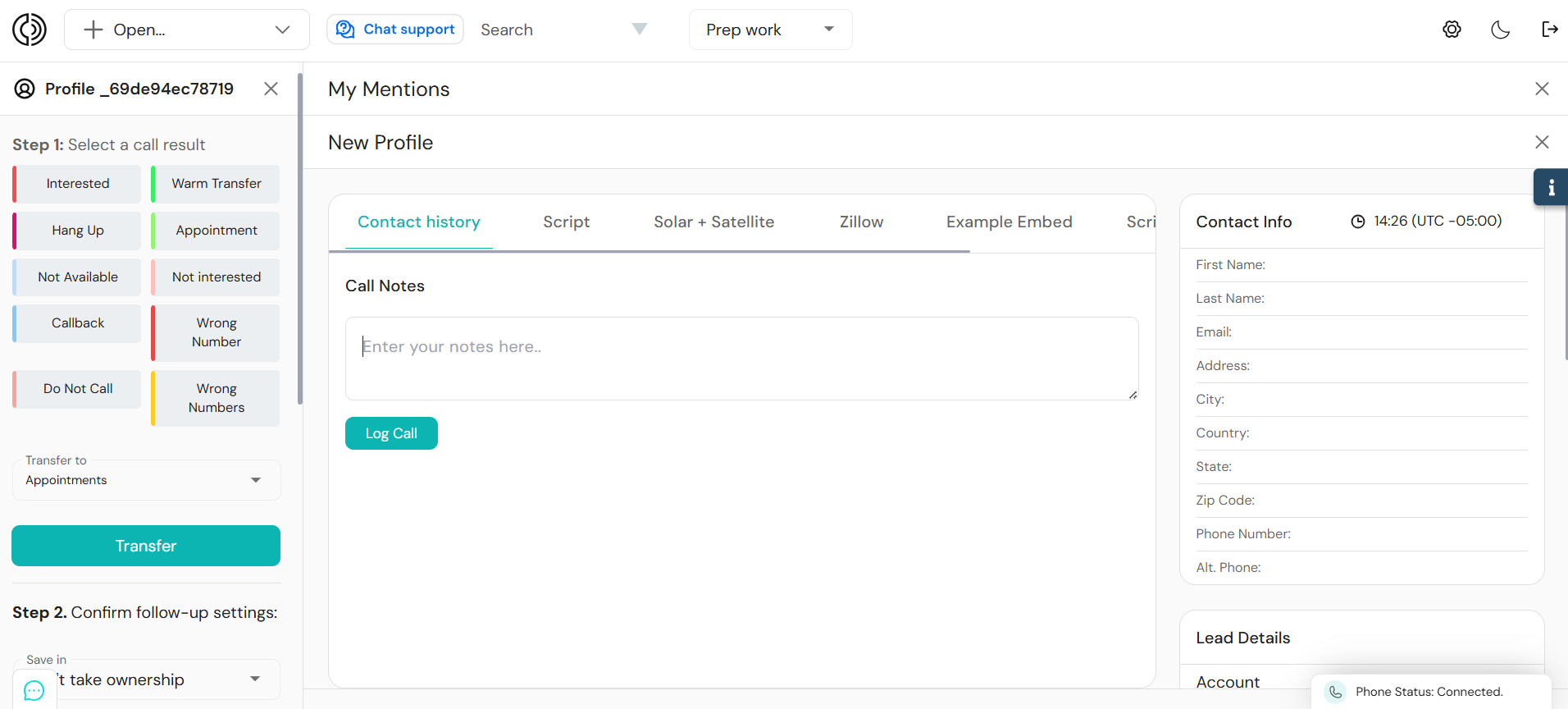
| One-Click Call Results | Agents log a result without leaving the call screen or clicking through menus. | Call Results are on the same screen as the call and can be applied in one click. |
| Automated Callback Scheduling | A callback request automatically triggers its own scheduling. | Logging a callback result schedules it automatically, based on the follow-up rule you’ve set for that disposition. You can also set a specific date and time instead of the default. |
| Internal DNC List Management | A DNC request removes the number from future dialing the moment the call ends. | A DNC-marked Call Result can add the lead to your internal Do Not Call list through Readymode’s compliance tools. |
| Built-In CRM or Integrated CRM Options | Lead history, call notes, and dispositions stay attached to the lead record without a separate sync step between two systems. | Readymode includes a built-in CRM, and Readymode iQ integrates with other CRMs. |
Let’s discuss these features in more detail.
1. Tailored Disposition Lists for Every Campaign
If your team runs a debt collection campaign and a solar sales campaign on the same platform, one generic disposition list won’t fit either one well.
Your agents will end up picking the closest match instead of the accurate one, and that weakens every report built on top of it.
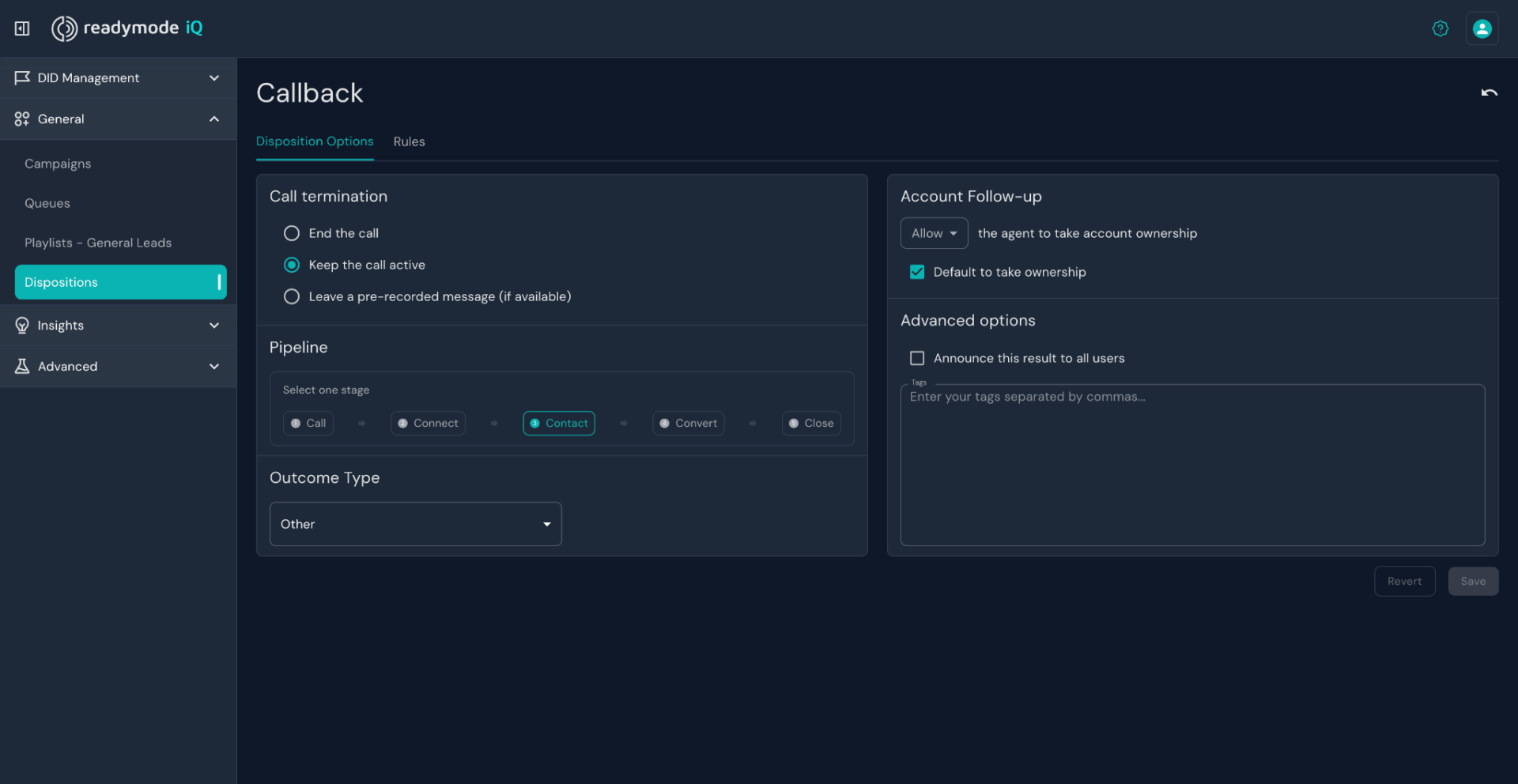
In Readymode iQ, you can build a separate disposition list for every campaign. You set the pipeline stage, the outcome type, and the follow-up rules for each one, per campaign.
The options you create there show up in the agent’s Call Results list automatically.
So instead of forcing every campaign into the same set of outcomes, you build a disposition list that actually matches how that campaign works.
Calldi, a Readymode customer, built separate dispositions for each of their campaigns. This kept outcomes accurate across different lead types instead of mixing results together. That structure helped them grow their agent productivity by 33%.
2. One-Click Call Results
When agents leave a menu or switch screens to log every outcome, they lose a few extra seconds every call. Across hundreds of calls a day, that adds up to significant lost time.
A dialer should let agents label a call without breaking away from the call itself. The result should stay on the same screen the agent is already working from, and selecting it should take one step.
Readymode’s Call Results work this way.
Agents log the outcome from the same screen the call happens on, and the platform applies the disposition’s default follow-up settings right away, so agents can close one call and move to the next without losing their rhythm.
3. Automated Callback Scheduling
An agent shouldn’t be manually writing down and remembering call back requests from prospects.
A disposition should be able to trigger a scheduled callback on its own, without needing a separate step or a separate tool.
When an agent marks a call as a callback, the dialer should be able to hold that lead and bring it back to a queue at the right time, automatically.
Readymode iQ ties action to the disposition itself.
When an agent logs a callback result, the platform can schedule the follow-up either at a defined time later, like three days out, or for the exact date and time the prospect asked for.
It then routes the lead back to the agent or campaign it belongs to, so the follow-up happens on schedule instead of depending on an agent’s memory.
4. Internal DNC List Management
If a prospect asks to be taken off your call list and that request isn’t properly logged and followed, your team could end up calling them again.
Under the TCPA, that can result in fines per call. Across a large campaign, those costs could add up to a significant amount.
A disposition should not only record Do Not Call (DNC) requests but also remove those numbers from future dialing the moment that call ends.
Readymode’s call disposition feature handles this by connecting directly with your internal DNC lists.
A Call Result marked as a DNC request can be configured to add the lead to your internal Do Not Call list as part of that same action, through the compliance tools built into the platform.
Compliance is your team’s responsibility. The compliance tools built into Readymode help you manage your DNC list, but keeping your campaigns compliant still depends on how your team sets up and uses those tools.
5. Built-In CRM or Integrated CRM Options
A dialer should give you a CRM built into the same platform your agents are already calling from, so lead history, call notes, and dispositions stay attached to the lead record without a separate sync step.
For teams already running a CRM they don’t want to leave, the dialer should also connect to it instead of forcing a switch.
Readymode includes a built-in CRM, so lead profiles, call history, and disposition data all live in one place by default.
For teams that need to connect outside tools, Readymode iQ also supports integrations with other CRM and lead management systems.
Put Clear Call Outcomes Into Practice
Start by reviewing the disposition list your team uses today. Pick the two or three outcomes agents mix up most often, tighten their definitions, and check what actually happens after each one gets selected.
Then watch an agent use the revised list during a live call wrap-up. That’s the real test of whether the changes are actually working.
As your operation grows with more agents, more calls, and more dispositions logged every day, the room for error grows with it.
If your current setup still relies on agents remembering the next step, it’s worth seeing what a platform built to handle that for you actually looks like in practice.
Book a demo with Readymode to see how call dispositions, compliance, and your CRM work together in one system.

Jawad Khan
Jawad is a seasoned content marketer and freelance technology writer featured in some of the world's leading digital marketing, e-commerce, and software related publications. As an expert contributor, Jawad has written for startups and enterprises, including Fortune 500 companies, across various tech verticals.