
A predictive dialer connects your agents to more live conversations every shift, and helps them stay more productive. It skips voicemails, busy signals, and no-answers, and connects agents only when someone actually picks up.
But that only happens when you configure your dialer the right way. Predictive dialing is an advanced capability that helps maximize agent talk time. Without the right supporting tools, it cannot produce high-converting campaigns on its own.
At Readymode, we work with outbound teams across a wide range of industries, and that gives us a firsthand view of when this approach delivers and when it falls short.
In this guide, we’ll explain what actually makes predictive dialing work, the common mistakes outbound teams make, and how Readymode’s dialer helps you get it right.
TL;DR: How To Get More From Your Predictive Dialing Campaigns
A predictive dialer calls multiple numbers at once and connects your agents only when someone picks up live. But the algorithm only performs well when you configure your dialing mode, pacing, lead pool, and compliance setup correctly.
Here’s how to do it:
- Match your dialing mode to the size and type of your list.
- Set the dial ratio to your actual agent count, not system capacity.
- Keep enough fresh leads in the campaign to sustain your pace.
- Build follow-up cadences around each lead’s last call outcome.
- Monitor caller ID reputation on an ongoing basis, before contact rates start to drop.
- Confirm calling windows and DNC scrubbing before every launch.
- Give agents wrap-up time to log the call result before the next call.
- Track conversations and conversions, not dial count alone.
What Is Predictive Dialing and When Should You Use It?
Predictive dialing is an intelligent dialer mode that decides how many numbers to dial at once depending on agent availability, instead of dialing at a fixed rate.
It does this by using an algorithm that considers the average call length and the number of agents working in a campaign. It then times the next round of dials to match agent availability.
Predictive dialers also filter out voicemails, busy signals, and no-answers before they ever reach an agent, so agents only connect once a real person actually answers.
The goal is to help agents stay productive by connecting them to live calls as soon as they’re free.
Predictive dialing works best for large contact lists, high-volume campaigns, and teams with several agents dialing at once, since the algorithm needs enough calls and enough agents to make accurate predictions.
Premier Home Solutions, a Readymode client, is a good example. The company moved off manual dialing and spreadsheets onto Readymode’s predictive dialer and later added Readymode iQ, and reported a four times increase in productivity as a result.
But it isn’t the right fit for every campaign.
A very small team, a short contact list, or personalized outreach that requires research before every call works better with a dialing mode that lets an agent control each call, like preview or power dialing.
Predictive Dialing Best Practices and Mistakes to Avoid
Predictive dialing runs on a well-defined algorithm in your dialer platform. But the algorithm only works as well as the setup behind it. The dialing mode, pacing, list quality, and follow-up rules all determine whether your dialer connects agents to real prospects or just burns through a list.
Based on our experience working with outbound teams, here are the eight best practices you should follow.
1. Match the Dialing Mode to the Campaign
Predictive dialing isn’t the right choice for every list. It’s built specifically for outreach where agents dial into large groups of prospects and the algorithm needs a steady flow of calls to predict pacing accurately.
Sales teams that leave predictive mode on by default run into trouble on small or specialized lists.
For example, if you turn it on for a batch of fifty warm leads that need individual research before each call, you’ll burn through the list fast without giving agents time to prepare.
Readymode solves this by offering four dialing modes: preview, power, progressive, and predictive. Each mode is built for a different campaign type.
Predictive dialing is right for a team running a large cold outreach campaign. But preview mode is the better option for a team calling a short list of qualified leads that each need a look at their account history before the call.
For a deeper breakdown of how these modes differ, see our full comparison.
2. Set Dialing Speed to Match Actual Agent Capacity
Predictive dialing works by placing multiple calls at once and predicting how many contacts will answer right as an agent frees up. That math falls apart when a manager sets the dial ratio as high as it goes without monitoring it.
Suppose a team of six agents are running a campaign at a ratio built for twenty. The system keeps dialing at that pace, calls start connecting faster than agents can pick up, and prospects get answered by silence or dead air before anyone reaches the line.
Every one of those instances counts toward your abandoned call rate.
So dial ratio should be based on live agent count, not maximum system capacity, and you should recheck it as agents log in and out through the shift.
Readymode gives you the option to run fully off the algorithm, which paces calls to agent availability on its own. But you can also set your own ratio if you’d rather control it directly. Either way, that’s what actually keeps agents in continuous call flow without leaving prospects on a dead line.
3. Keep Enough Usable Leads in the Campaign
A predictive dialer runs on a steady stream of live people to call. But a long list alone doesn’t guarantee that.
When a campaign runs low on fresh leads, dialing faster doesn’t fix it. It just pushes more attempts onto numbers that have already gone unanswered five or six times that week, which burns agent time, adds nothing to the pipeline, and can also damage your caller ID reputation.
Readymode’s lead management tools show how many times each lead has been dialed, so you can catch a shrinking pool before agents start working a dead list. Refresh the list before you push the pace back up.
4. Build Call Cadences Around Previous Outcomes
Every lead should get a follow-up cadence based on how your agent’s last interaction with it went. Do not use a fixed schedule applied to the whole list.
For example, a lead that asked for a callback next week needs a completely different follow up approach than a lead who hit voicemail or one who hung up outright.
If your team recycles every lead through the same follow-up sequence, you’ll frustrate prospects and hurt your conversions.
Leads that asked for a callback will get called too early, and the follow-up will feel pushy. Leads that only ever hit voicemail will get treated the same as leads who’ve already had a live conversation, so agents keep dialing numbers that were never reached in the first place.
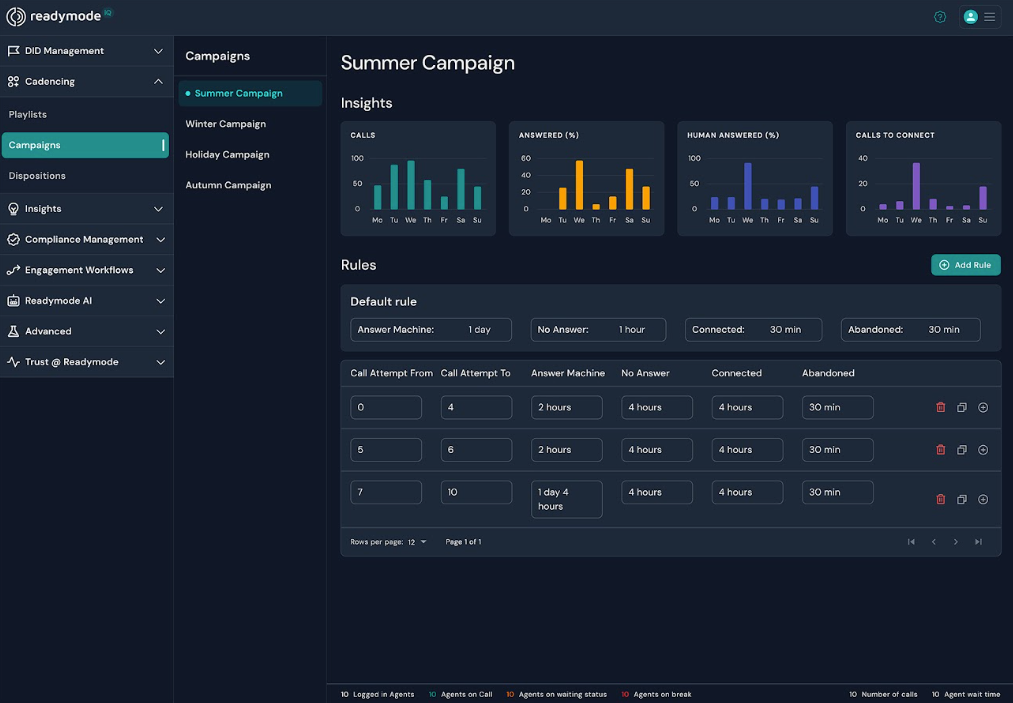
Readymode’s dialing platform offers custom dispositions and call cadences, which means you can schedule the next call attempt based on how the last one ended. This means a callback request, a hang-up, and a voicemail each move through their own cadence instead of one generic loop.
5. Proactively Monitor Caller ID Reputation
Monitoring caller ID reputation on a regular basis should be part of your standard operations. Your goal is to proactively prevent flagged numbers from impacting your campaign performance, instead of taking corrective actions later.
Reputation lowers when carriers flag numbers for generating too many unanswered calls and label them “Spam Likely.” Once prospects see that label, they stop picking up calls from those numbers, and by the time your contact rate reflects it, the damage is already done.
Most teams only look at caller ID reputation after contact rates fall, then try to fix it by dialing more. That makes it worse. Dialing more from a flagged number sends carriers the same bad signal and pushes the flag further.
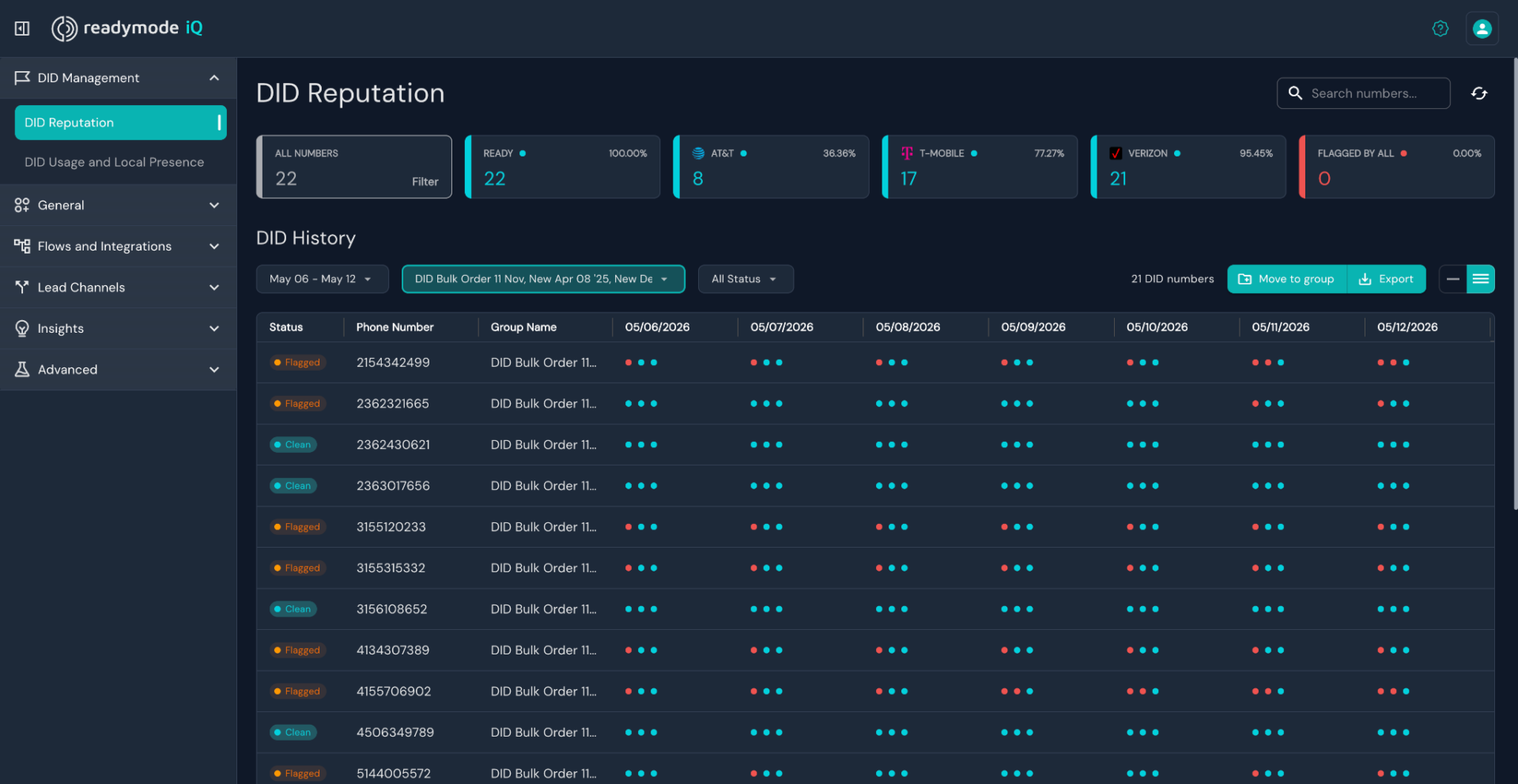
Readymode iQ comes with built-in caller ID reputation monitoring that shows you which numbers carriers have flagged, so you can catch a problem before it starts impacting your contact rate. It also includes Assisted Remediation, which helps register your numbers to reduce negative call labels.
6. Check Calling Restrictions Before You Launch
Dialer settings are only one piece of a compliance program. They don’t cover everything on their own.
The TCPA sets the federal default calling window, 8 AM to 9 PM local time. States can layer their own rules on top of that, often called ‘mini-TCPAs,’ though they’re separate laws from the TCPA itself. Florida, Maryland, and Mississippi, for example, cut that window to 8 AM to 8 PM.
Outbound teams often assume their dialer handles this automatically. But that’s not always the case. If you set up your calling hours or DNC scrubbing wrong, you can violate the TCPA even with a fully configured dialer, and that can mean heavy fines.
Readymode iQ includes built-in tools that support compliance workflows, including state calling restrictions and internal DNC list management. It also integrates with list scrubbers for the National DNC Registry and the Reassigned Numbers Database.
You can incorporate these tools into your broader compliance process to apply calling windows for each lead based on their location, and keep your internal DNC list up to date as agents log requests.
7. Prepare Agents for the Next Live Conversation
An agent shouldn’t move to the next call before logging the previous call’s result and setting any follow-ups.
If you skip this step, your team won’t know which leads need a repeat call or which prospects asked not to be called again. That creates multiple operational and compliance problems.
To avoid this, build wrap-up time into your call pacing instead of squeezing it out. A few extra seconds between calls costs less than a missed follow-up or a prospect you call again after they told you to stop.
Readymode’s dialing platform paces calls to actual agent availability, which gives agents room to close out one call before the next one connects.
8. Review Conversations and Conversions Alongside Call Volume
Don’t judge the success of a campaign by dial count alone. A higher number of dials doesn’t mean your team is performing better, it just means the system placed more calls.
Track how many of those calls turned into real conversations and how many conversations turned into conversions. If dial volume goes up but contact rate and conversion rate stay flat or drop, you need to review your campaign set up.
But to know that, you’ll need a dialer platform that offers in-depth reporting tools and campaign analytics.
Predictive dialing can inflate the temptation to chase volume, since the algorithm is built to keep agents in constant call flow. But it connects agents only to live calls, so a spike in dials should also show up as a spike in conversations.
Readymode’s reporting tools let you track contact rate, conversion rate, and call volume, so you can see whether more dials are actually producing better results.
Predictive Dialing Pre-Launch Checklist
Run through these eight checks before you launch your next predictive dialing campaign.
- Match the dialing mode to the list. Use predictive for large campaigns, preview for short, detail-heavy lists.
- Confirm your dial ratio. Use Readymode’s default pacing to adjust automatically as agents log in and out, or set your own ratio if you’d rather control it manually.
- Refresh your lead pool. Confirm you have enough unworked leads before you increase pace.
- Build cadences around call outcomes. Give callbacks, voicemails, and hang-ups their own follow-up schedule.
- Check caller ID reputation. Confirm your numbers aren’t flagged before you touch dial volume.
- Confirm calling windows and DNC management. Verify your compliance setup instead of assuming the dialer handles it.
- Build in wrap-up time. Let agents log the call result before the next call connects.
- Review conversations and conversions alongside dial count. Check contact rate and conversion rate, not raw volume.
Put Your Predictive Dialing Strategy Into Practice
Don’t overhaul your existing campaigns all at once. Pick one active predictive dialing campaign and run it through the checklist above. Check the dialing mode, dial ratio, lead pool, and caller ID reputation on your numbers.
Fix what’s off, then watch how contact rate and conversion rate respond over the next few days.
If your current dialer doesn’t give you that visibility, book a demo with Readymode to see how a platform built for predictive dialing handles all eight of these in one place.

Jawad Khan
Jawad is a seasoned content marketer and freelance technology writer featured in some of the world's leading digital marketing, e-commerce, and software related publications. As an expert contributor, Jawad has written for startups and enterprises, including Fortune 500 companies, across various tech verticals.