
Research shows that it takes an average of five follow-ups to close a sale. Most outbound teams know that. The hard part comes from doing it consistently.
When you lack a structured follow-up system, your team calls some leads too often and forgets others completely. Your agents depend on memory, spreadsheets, and scattered reminders, and your pipeline loses valuable opportunities.
An automated lead follow-up system gives you a repeatable way to manage outreach. Your dialing platform schedules calls, prioritizes leads, and guides your agents through a clear call cadence instead of forcing them to track every attempt manually.
In this guide, we’ll explain how automated lead follow-up works and how you can build a system that improves your contact rates and conversions.
TL;DR: What Is an Automated Lead Follow-Up System and How to Build One
An automated lead follow-up system is a structured workflow inside your dialing platform that ensures every lead receives timely and consistent outreach without agents manually tracking follow-ups.
Key benefits:
- Ensures every lead receives consistent follow-up attempts
- Increases speed to lead and improves contact rates
- Prevents leads from slipping through the cracks
- Improves agent productivity by reducing manual tasks
- Generates cleaner performance data to optimize outreach
How to set up an automated follow-up system:
- Capture leads directly into your CRM from forms, ads, or lead providers.
- Route leads into dialing campaigns so agents can begin outreach.
- Configure dialing modes and call cadences for structured follow-up.
- Place calls and log outcomes such as voicemail, no answer, or connected call.
- Automatically schedule the next attempt based on the outcome.
- Track performance metrics and refine your outreach strategy.
Readymode makes this process simple by combining a dialing system, CRM, automated call cadences, and performance reporting into one platform that keeps your follow-up workflow running seamlessly.
What Is an Automated Lead Follow-Up System?
An automated lead follow-up system is a workflow built inside your dialing platform that gives your team a structured way to contact every lead at the right time without relying on manual reminders or spreadsheets.
Think of it as an additional automation layer on top of a conventional dialing platform. This layer manages how and when your team follows up with leads.
Instead of asking agents to track every call attempt manually, your dialing platform uses automated follow-up capabilities to manage the process. The system schedules call attempts, organizes leads into campaigns, and guides your agents through a consistent call cadence.
This structure turns outbound calling into a repeatable workflow. Your team focuses on conversations and qualification while your dialing software handles timing, prioritization, and follow-up scheduling.
Here’s how a typical automated follow up system works:
| Step | What the System Does |
| Capture the lead | Collect lead information from forms, ads, or lead providers and store it in the CRM |
| Assign lead to campaign | Route the lead to the appropriate agent or dialing campaign |
| Schedule call attempts | Apply a call cadence that determines when follow-ups happen |
| Execute calls | The dialer places calls and connects agents to live prospects |
| Log outcomes | Agents record results like voicemail, no answer, or connected call |
5 Main Benefits of Automating Lead Follow-Up
Manual follow-up often creates inconsistency. Your agents may call some leads too often while forgetting to contact others. Automation removes that problem by creating a repeatable system for outreach.
Here are some of its key benefits.
- Maintain consistent follow-up: An automated system ensures every lead receives the correct number of call attempts based on your call cadence. Your team no longer depends on memory or spreadsheets to track follow-ups.
- Increase speed to lead: Research shows that waiting just 30 minutes to call a new lead makes you 21 times less likely to qualify them compared to calling within five minutes. Automation routes new leads into your dialing workflow immediately so your team can respond while interest remains high.
- Prevent leads from falling through the cracks: An automated system schedules every follow-up attempt until the lead converts or is closed.
- Improve agent productivity: An automated system continues scheduling follow-up attempts until the lead converts or reaches a final disposition.
- Generate better performance data: When your system tracks every call outcome, you can measure important outbound sales metrics such as contact rate, connect rate, attempts per lead, and conversion rate. These insights help you refine your outreach strategy and improve results over time.
For example, one Readymode client, VABizGrowth, increased contact rates by 500% after implementing Readymode iQ to structure dialing workflows and optimize outreach campaigns.
By combining automated call cadences, predictive dialing, and performance reporting, outbound teams can turn inconsistent follow-up into a structured system that drives more conversations and conversions.
How to Create an Automated Lead Follow-Up System Over the Phone
A strong follow-up system needs a workflow that moves every lead from capture to conversation without delays or missed attempts.
Step 1: Capture Leads in a CRM
The first step in building an automated follow-up system involves setting up an integrated lead generation system. Route every new lead directly into your CRM so your follow-up workflow starts automatically.
Connect your website forms, landing pages, paid ads, and lead providers so submissions flow straight into your system instead of manual spreadsheets or list uploads. This setup ensures your team can act on new leads immediately.
A platform like Readymode simplifies this process because it combines a dialing system with a built-in CRM and also integrates with lead capture and management tools. That structure reduces friction and keeps your lead data flowing seamlessly from capture to outreach.
Step 2: Upload Leads to Your Dialer
Next, send captured leads into your dialing environment so agents can start outreach. Upload lead lists into your dialer manually or sync them through integrations with your CRM or lead capture tools.
This step connects lead capture with actual outreach. Once leads enter your dialing campaigns, your system can assign them to agents, prioritize them based on rules, and trigger your follow-up cadence.
With Readymode, your dialer and CRM can work together within the same platform, while integrations connect your lead capture sources to your outreach workflow. Depending on your setup, you can sync leads automatically or manually upload them into dialing campaigns. This helps reduce delays between lead capture and outreach.
Step 3: Configure Your Dialing Strategy and Call Cadence
Next, configure how your system will contact leads. Assign leads to specific campaigns or agents and choose the dialing mode that fits your outreach strategy.
In Readymode, you get four different dialing modes for different workflows. For example:
- Preview dialing gives agents time to review lead details before calling.
- Power dialing calls one lead at a time with minimal delay.
- Progressive dialing automatically places the next call when an agent becomes available.
- Predictive dialing places multiple calls at once and connects agents only when a live prospect answers, eliminating time spent on unanswered calls or voicemails.
With Readymode iQ, you can also create custom call cadences that define when and how often your system follows up with each lead. These cadences automate the timing of follow-up attempts and help maintain consistent outreach without over-dialing prospects.
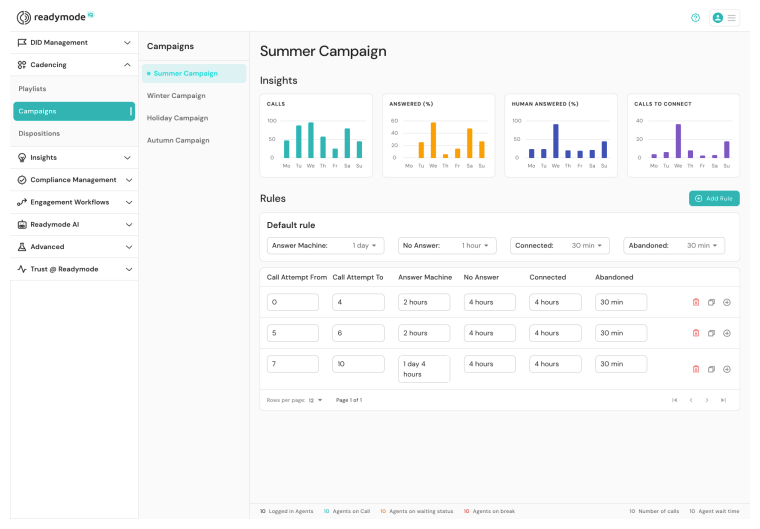
Step 4: Execute Calls and Log Outcomes
After you configure your dialing strategy and call cadence, your system can begin executing outreach automatically.
Your dialing platform places calls and routes live answers to available agents so your team can focus on conversations instead of manual dialing.
After each interaction, your agents should log the call outcome in the system. Typical results include no answer, voicemail, connected call, appointment booked, or not interested.
Accurate outcomes keep your lead pipeline organized and ensure the system knows how to handle each lead moving forward.
With Readymode, dialing, call routing, and outcome tracking all happen inside the same platform, which keeps your outreach workflow consistent and easy to manage.
Step 5: Schedule the Next Follow-Up Automatically
Once your agents log the call outcome, your system automatically determines the next action based on your follow-up rules.
For example:
- No answer → schedule another call attempt
- Voicemail → retry later in the cadence or leave a prerecorded message using voicemail drop
- Connected call → update lead status
- Appointment booked → remove the lead from the campaign
This logic allows your follow-up system to run with minimal manual tracking. Each outcome triggers the next step in your call cadence until the lead converts or reaches a final status.
Step 6: Track Results and Continue to Optimize
Once you build an automated follow-up system, continue tracking performance and improving your workflow over time.
Monitor key outbound metrics such as connect rate, contact rate, and conversion rate to understand how well your outreach performs.
Use these insights to refine your dialing strategy, adjust call cadences, and improve lead prioritization. Over time, these small adjustments can significantly increase conversations and conversions.
Readymode iQ tracks these metrics through built-in reporting and analytics dashboards. This visibility helps you identify performance trends, coach agents, and continuously optimize your follow-up system.
Lead Management Best Practices
No matter how efficient your automated follow-up and dialing systems are, your team will struggle to close deals consistently without disciplined lead management.
Lead management is the process of organizing, prioritizing, and tracking your leads so your agents always focus on the right prospects at the right time.
Here are several lead management best practices outbound teams should follow.
Best Practice #1: Keep Your Lead Data Clean
Clean data allows your automated follow-up system to run efficiently by ensuring the dialer works with accurate information instead of wasting attempts on invalid or duplicated leads.
For a healthy list, regularly remove duplicate records, incorrect phone numbers, and outdated contacts. Validate phone numbers when importing leads, and review campaign lists weekly to prevent agents from dialing bad or repeated data.
You should also standardize lead fields and enforce consistent data entry rules so every record contains usable contact details.
Best Practice #2: Respond to New Leads Immediately
Set rules that route new leads directly into active campaigns so agents can contact them within minutes.
Faster follow-up keeps prospects engaged and significantly improves contact rates because interest is highest right after someone submits a form or responds to an ad.
Configure alerts or automated routing so new leads move to available agents instantly instead of sitting in queues.
When your system responds quickly, your automated outreach sequence begins while the prospect still remembers their original inquiry.
Best Practice #3: Protect Your Caller ID Reputation
A strong caller ID reputation ensures that your automated dialing campaigns reach real prospects instead of getting ignored or blocked by carriers.
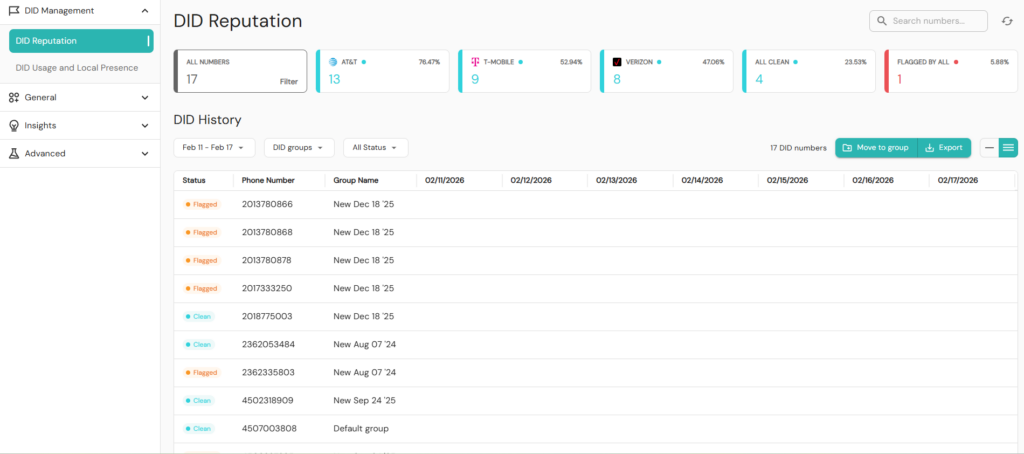
To maintain a healthy caller ID reputation, monitor how your numbers appear to recipients and rotate numbers to prevent negative labels. Spread call volume across multiple numbers to reduce the risk of spam flags and maintain healthy answer rates.
Readymode’s Autopilot feature further automates caller ID management by intelligently selecting the best numbers to use for each call, helping maintain answer rates at scale.
Readymode iQ also lets you pause or remediate numbers that begin showing performance drops to restore their effectiveness.
Best Practice #4: Prioritize High-Intent Leads
Segment leads by source, engagement level, or buying signals and route high-priority prospects to faster follow-up cadences.
Leads who recently filled out forms, clicked ads, or requested information usually show higher purchase intent.
Prioritizing these leads ensures your agents contact them while interest remains high.
When your automated follow-up system recognizes and prioritizes high-intent leads, it directs outreach toward prospects most likely to convert instead of treating every lead the same.
Best Practice #5: Use Multiple Touchpoints
Combine outbound calls with email or SMS follow-ups so prospects encounter your outreach across several channels.
Some prospects ignore unknown calls but respond after seeing a text message or email first. Coordinating multiple touchpoints reinforces your message and increases the chances of engagement.
When you integrate these channels into your outreach workflow, your automated follow-up system can maintain consistent communication even when a prospect misses the initial call.
Readymode helps you implement these practices through built-in tools such as lead management, caller ID reputation monitoring, Autopilot number selection, and real-time reporting dashboards.
These features help you maintain clean data, protect answer rates, and monitor campaign performance while your automated follow-up system runs in the background.
Build Your Automated Follow-Up System Today
An automated lead follow-up system lets your team focus on meaningful conversations and deliver consistent outreach to every prospect.
It reduces operational costs by increasing agent productivity and eliminating manual follow-up tasks that often cause leads to slip through the cracks.
Readymode iQ makes this process simple by combining multiline dialing, built-in CRM, automated call cadences, caller ID reputation management, and real-time reporting into one platform.
If you haven’t tried Readymode iQ yet, book a free demo to see it in action.

Jawad Khan
Jawad is a seasoned content marketer and freelance technology writer featured in some of the world's leading digital marketing, e-commerce, and software related publications. As an expert contributor, Jawad has written for startups and enterprises, including Fortune 500 companies, across various tech verticals.